Queues, purge and bulk cancel
The dashboard's Queues page shows how much work is waiting on the broker for each queue, lets you look at the messages waiting in one, delete or move a single message, and purge a queue; the task list can cancel many runs at once. All of these are thin wrappers over Celery/kombu primitives; this page is about what they actually do, and where they can't see.
Which queues are listed
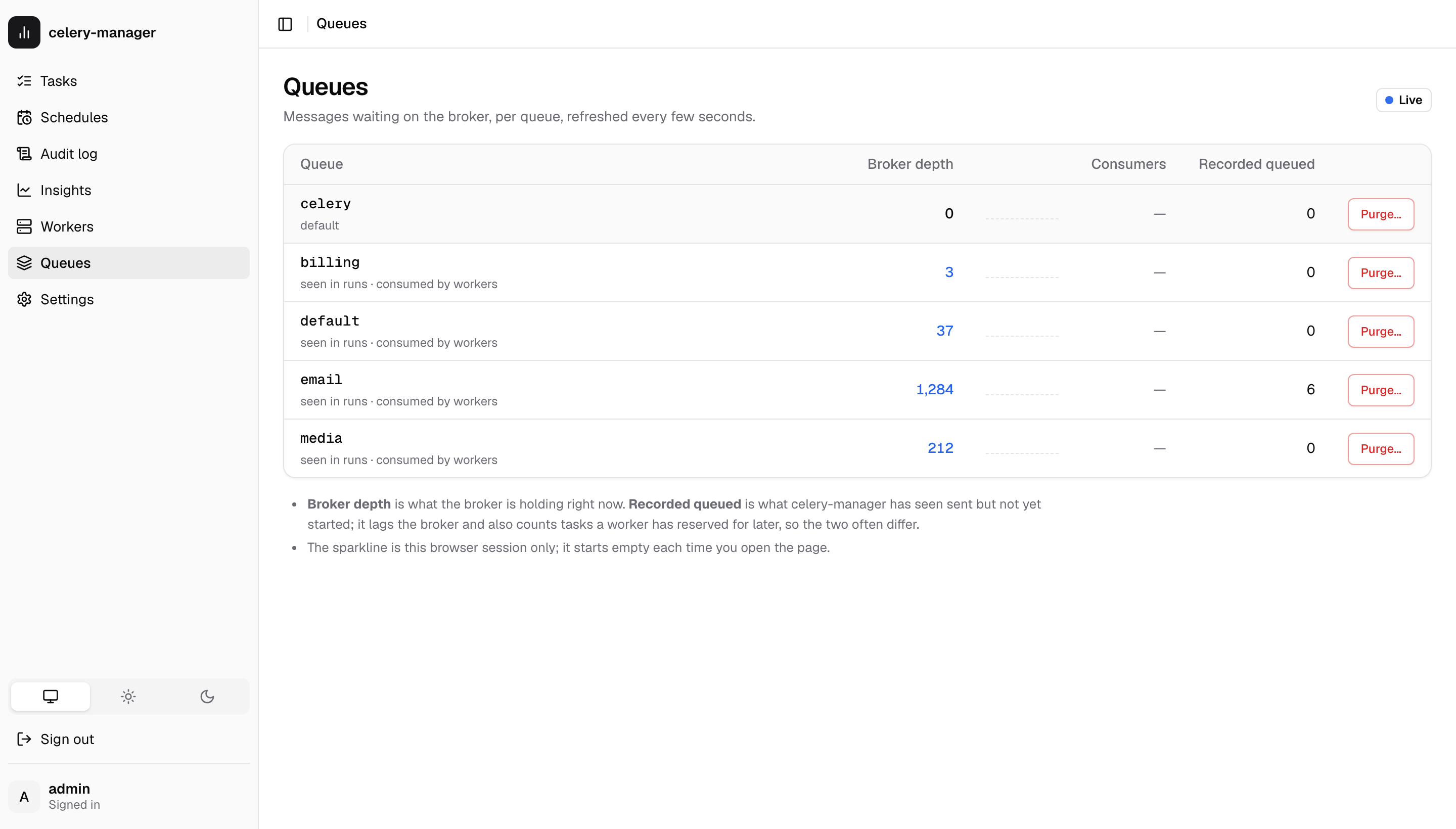
A queue appears if celery-manager knows its name from any of:
| Source (shown under the name) | Where it comes from |
|---|---|
| default | celery_app.conf.task_default_queue ("celery" if unset) |
| configured | celery_app.conf.task_queues |
| routed | celery_app.conf.task_routes — dicts and lists of dicts. Router functions are skipped, since reading them would mean calling your code. |
| seen in runs | any task_runs.queue value (written by the events listener) |
| consumed by workers | inspect().active_queues() from live workers, 1s timeout, cached for 30s |
A queue that none of these mention isn't listed. If your workers consume a queue nothing else names and no worker answered the inspect, it is missing until one does; the page says so when no worker replied.
Two numbers that disagree
Each queue shows two counts:
- Broker depth: messages the broker is holding right now, read with a
passive
queue_declareon a short-lived connection. Nothing is created by looking. - Recorded queued:
task_runsrows in this queue whose status is stillqueued, which is what celery-manager has seen.
They routinely differ, and neither is wrong:
- tasks sent while the events listener was down never got a row;
- the listener lags the broker by however long event delivery takes;
- a worker pulls ETA/countdown tasks off the queue right away and holds them
until they're due. Broker depth drops, but the run is still
queued; - runs written by the decorator or a retry don't know their queue until the listener fills it in. Those are counted separately ("no recorded queue yet") rather than guessed into the default queue.
Consumers is the broker's consumer count. Redis, SQS and the other
kombu virtual transports always report zero, so on those it is shown as
unknown (null), not 0.
The sparkline is the depth recorded over the last 24 hours (see Depth history); select it for a larger chart. Until two samples exist (the sampler is off, or just started) it falls back to the depth over this browser session, which is scaled to the session's own low and high and starts empty every time the page opens.
Wait time
The Wait p50 / p95 column is how long runs sat in the queue before a worker started them, over the last 15 minutes:
wait = started_at - max(sent_at, eta)
sent_atis the timestamp of thetask-sentevent, which the events listener stores on the run (received_at, fromtask-received, is stored beside it). The earliest value seen wins: a duplicate or late event can never push it later and shrink the wait. A run that never had a send time recorded (the client doesn't emittask-sent, the listener was down) is left out, not guessed at. The producer must emittask-sent(task_send_sent_event = True, see the quickstart).- ETA and countdown time is not waiting. A task sent with
countdown=300is meant to sit for five minutes; its wait is measured from the moment it was due. The listener storesetafrom the same events. - A retry reuses the task id, so a retried run forgets its first attempt's
sent_at/etaand is left out of wait statistics unless the new attempt's events refill them. - Negative results (the producer's clock ahead of the worker's) count as 0.
- Only runs that started inside the window count, and a queue with none
shows
—.
The worker-side decorator does not write received_at: Celery does not hand
the receive time to the task, and approximating it would be wrong more often
than it is right. The listener's event is the one source.
How the percentiles are computed. Not in SQL: percentile_cont exists
on PostgreSQL only, and celery-manager also runs on SQLite and MySQL. The
window's raw send/ETA/start values are read (newest 50,000 runs at most) and
p50, p95 and the maximum are computed in Python with linear interpolation.
Under the cap the numbers are exact; above it they describe the newest runs
(the API says so with truncated). The cost is that one request reads up to
that many narrow rows; the window is short, and the same figure feeds
metrics, the task Insights page (over its
chosen range), the task's detail page ("waited 2.3s before starting") and the
queue_wait alert.
Depth history
The events listener (celery-manager events) runs a small sampler thread
that, every queue_sample_interval_seconds (60 by default, 0 turns it
off), lists every known queue exactly as the Queues page does (same
connection timeout and 3 s deadline, so a dead broker costs a skipped tick,
never a hang) and stores one row per queue in queue_depth_samples(sampled_at,
queue, depth), indexed by (queue, sampled_at).
- Only depths the broker reported are stored. An unreachable broker, a
transport that can't report depth (
memory://) and a RabbitMQ queue nobody has declared are skipped, not stored as0: a0would read as "empty" and hide the outage. A Redis queue that is simply empty is a true0and is stored. - Several listener processes. The sampler dedupes per interval on a best-effort basis: before sampling it looks at the newest sample row, and if that is younger than 60% of the interval another process just sampled and it skips the tick. It is a read, not a lock, so two processes ticking in the same instant can both write. That costs one extra point per queue, which the chart and the growth rule tolerate, so correctness never depends on exactly-once.
- Retention. Samples older than
queue_sample_retention_days(14 by default,0keeps them) are deleted by the retention prune (celery-manager prune, thepruneCelery task) and, at most once an hour, by the sampler itself, so a deployment that never schedules the prune still stays bounded. A prune's summary reportssamples_deleted.celery-manager prunehas no config, so it uses the 14-day default. - The chart.
GET /api/queues/{name}/history?hours=24returns the window cut into at most 240 buckets (never narrower than a minute), each holding the highest depth sampled in it so a spike is not averaged away. Gaps in sampling are gaps in the line. The dashboard offers 1 hour, 6 hours, 24 hours and 7 days.
The queue_growing alert
It fires per queue when the samples of the last minutes (default 15) show
the queue rising monotonically-ish. All of these must hold:
- at least three samples, spanning at least half the window, the newest not older than half the window;
- the depth rose by at least
min_increase(default 50) from the first sample to the last; - at most 20% of the steps between consecutive samples go down (flat steps are neutral);
- no single step down is larger than half the net rise.
So noise and a short dip are tolerated, a sawtooth or a queue that climbs and then drains is not, and a queue that jumped once and then stays high still counts (nothing is draining it). With too few or too old samples the queue is unknown: an open incident stays open instead of being resolved by a gap in sampling. If no sample exists at all the rule says so ("couldn't check").
When the broker can't be asked
GET /api/queues always answers 200. Broker trouble shows up as
broker.error and depth: null per queue, with the recorded counts still
filled in:
- unreachable / auth failure: one connection attempt with a 2s connect timeout, no retry loop;
- slow: the whole broker round-trip has a 3s deadline. A broker that accepts the connection and then hangs can't hang the request; the stuck call finishes in a small background pool;
memory://andfilesystem://: reported as unsupported. The in-memory transport is private to each process, so the API process would only ever see its own empty queues, and the filesystem transport can't count the messages in its directory (it would answer0for a full one). A confident0would be a lie, so the page says "queue depth isn't available" instead;- queue not declared: depth
0,exists: false. On Redis that just means empty (Redis deletes a list when it drains); on RabbitMQ the reason says nobody has declared it yet.
The page refreshes every 5 seconds and stops while the browser tab is hidden.
Broker health
The Broker panel at the top of the Queues page, and GET /api/broker/health
(any signed-in user), answer a different question from queue depth: is the
broker itself up, and is it in trouble? What can be shown depends on what the
broker lets a client see.
| Transport | What you get |
|---|---|
| Redis (including Sentinel) | Reachable, latency, version, memory used against maxmemory (a bar; maxmemory of 0 means unlimited, so no bar), eviction policy, connected and blocked clients, evicted keys, refused connections, RDB/AOF status, uptime. |
| RabbitMQ (AMQP) | Reachable, latency, product and version. Memory and disk alarms need the RabbitMQ management API, which celery-manager doesn't talk to yet, so the panel says management: not configured instead of implying there are none. |
| Anything else | Reachable, latency, and "details not available for |
The eviction policy is the one to watch. A queued task is a key in a Redis
list. If maxmemory-policy is anything other than noeviction
(allkeys-lru, volatile-ttl, ...), Redis deletes keys when it runs out of
memory, and it can delete queued tasks, which then never run and leave no
error. The panel shows a warning for any other policy (and for a nonzero
evicted_keys). Set maxmemory-policy noeviction: a full Redis then refuses
new tasks, which you can see, instead of losing old ones, which you can't.
With no maxmemory set nothing is evicted today, and the warning says so.
The check opens one connection with the same 2s connect timeout and 3s
deadline as the queue list and never raises: an unreachable broker is
reachable: false with the error. The broker URL is shown with its password
masked, and the same masking is applied to error text. The panel refreshes
with the page. The numbers are also in /metrics and drive the
broker_unreachable and broker_memory alert kinds.
Looking inside a queue
Click a queue's name on the Queues page to see the messages waiting in
it, next to run first: position, task name and id (linked to the run when
celery-manager has recorded it), priority, age, ETA, retries, size and the
arguments. GET /api/queues/{name}/messages?limit=50&offset=0 returns the
same list. Any role can look.
Redis: exact, and nothing is taken
Kombu keeps a Redis queue as plain lists, one per priority step (0, 3,
6, 9 by default; the queue's own name for 0 and <name>\x06\x163 and so
on for the others, under any global_keyprefix). Producers push at the head
and workers pop from the tail, step 0 first. On Redis a lower priority
number runs sooner, the opposite of RabbitMQ. celery-manager reads the
lists in that same order with LRANGE, which takes nothing off the queue,
so the order shown is the order workers will take them, as of that moment.
RabbitMQ: approximate, off by default
RabbitMQ has no way to read a message without handing it out. The only way
to look is to take messages without acknowledging them (basic_get) and
reject them back onto the queue. That has side effects:
- while they are being read (milliseconds), workers can't take them;
- RabbitMQ marks every message read as redelivered;
- a message put back may land at a different place, usually the front, so the order shown can change just by looking.
So browsing RabbitMQ is off until you set queue_browser_amqp=True. With it
on, the dashboard says the view is approximate and lists these side effects,
the API returns approximate: true and side_effects, and at most 20
messages are read per look, whatever page size is asked for. Queue depth is
unchanged afterwards. With it off, and on any transport other than Redis and
RabbitMQ, the answer is supported: false with the reason.
Arguments
Arguments follow the same rule as task runs: every role sees them (see
Roles). They come from the argsrepr and
kwargsrepr headers the producer wrote (already shortened by Celery's
argsrepr_maxsize), or, for messages without them, from the body if it is
JSON and under 64 KB. Pickled bodies are never decoded: unpickling would run
whatever code the message names inside the dashboard process. Long arguments
are cut to 2,000 characters, and the raw body is never sent to the browser.
If your task arguments carry secrets, set queue_browser_show_args=False.
The arguments are then left out of the response for every role, not just
hidden on the page.
Age is only known for some messages: Celery doesn't put a send time on a
message. It is shown for messages beat sent through celery-manager's
stamping scheduler (cm_sent_at header) and for runs that record when they
were sent.
Deleting or moving one message (Redis)
Admins get Delete and Move on each message, each with a confirmation.
- Delete removes that one message for good. If celery-manager recorded
its run as
queued, the run is markedrevoked, as a purge does, because no worker will ever report on it. Audited asdelete_message. - Move sends it to the end of another queue, keeping its priority, and
records the run's new queue. The target must be a queue celery-manager
knows (configured, routed, seen on a run, or consumed by a worker), so a
typo can't create a queue nobody reads. The message's own routing fields
are updated too, so if a worker takes it and then dies, Redis puts it back
on the new queue, not the old one. Audited as
move_message.
Both find the exact stored message by task id and remove that exact entry
in one Redis transaction (WATCH on the list, then LREM and, for a move,
LPUSH). If a worker takes the message in between, the transaction does
nothing and the answer is 409 "already taken by a worker": the message is
never both run and moved, and a delete is never reported for a message that
ran. A message that isn't waiting there at all is a 404.
These need Redis. On RabbitMQ a single message can't be taken out of the
middle of a queue, so delete and move answer 409.
Stuck and lost tasks (Redis)
Redis has no acknowledgements of its own, so kombu emulates them. When a worker
takes a message off a queue, kombu copies it into a hash (unacked) and records
the time in a sorted set (unacked_index). Acknowledging the message deletes
both. If the worker dies first (kill -9, the OOM killer, a lost host), the
message stays there. It is no longer on the queue and no worker has it, so it
isn't in the queue depth or the worker list.
kombu puts such messages back on their queue once they are older than the
visibility timeout (visibility_timeout in broker_transport_options,
3600 seconds by default), but only while some worker on that broker is running
to do it. Until then the task is lost from view.
Held tasks → Stuck (Redis) lists every unacknowledged message, oldest first
(at most 500, with the total), each with its task, queue, how long it has been
held, its ETA if it has one, and the status recorded for the run. Each message
is checked against what live workers report (inspect active, reserved and
scheduled):
| State | Meaning |
|---|---|
| Running | A live worker is executing it. That is normal for acks_late tasks, which are acknowledged when they finish. |
| Held by a worker | A live worker has it prefetched or is holding it until its ETA. Normal. |
| Orphaned | No worker that answered has it: its worker most likely died. |
| Unknown | The workers couldn't be asked, so nothing can be classified. |
The Redelivery column says when kombu will put an orphaned message back (the visibility timeout minus its age), or that it is already past it. A held ETA task whose countdown is longer than the visibility timeout is a known Celery pitfall: kombu redelivers it while the first worker still holds it, and the task runs twice.
celery-manager reads the key names, the global_keyprefix and the visibility
timeout from kombu's own Redis channel, so custom settings are picked up.
Restoring a message
Operators can put chosen messages back at the front of their queue now instead
of waiting for the visibility timeout. Restore does exactly what kombu does
after the timeout: in one WATCH/MULTI transaction it removes the entry from
unacked and unacked_index and pushes the stored message back with kombu's
own _do_restore_message (same format, marked redelivered). The workers are
asked again just before restoring:
- a message a live worker is running is always refused;
- a message a live worker holds (prefetched or scheduled) is refused unless you also tick the force option, because that worker will still run it;
- if the workers can't be asked at all, nothing is restored (
409).
Restoring can run a task twice
A worker that is alive but slow to answer looks the same as a dead one. And a task whose worker died partway through runs again from the start. Only restore tasks that are safe to repeat. The dashboard asks you to confirm with this warning.
Each restore that put anything back writes a restore_unacked audit row.
Messages that were acknowledged or restored by kombu in the meantime are
reported as missing.
Other brokers
RabbitMQ tracks unacknowledged messages itself and redelivers them as soon as
the consumer's connection closes, so nothing gets stuck the way it can on
Redis. On RabbitMQ (and other non-Redis transports) the endpoint answers
{"supported": false, "reason": ...}. The RabbitMQ management UI shows
unacknowledged counts per queue, and the planned RabbitMQ management
integration (roadmap) will show them here.
Purging a queue
POST /api/queues/{name}/purge calls queue_purge on that one queue and
returns how many messages the broker removed. The dashboard asks you to type
the queue name first. There is no "purge every queue" action.
Only ready messages are removed. Messages a worker has already reserved (prefetched, or ETA/countdown tasks it is holding) are not in the queue any more and still run.
What happens to the recorded runs
A purged message never reaches a worker, so no task-revoked event will
ever arrive for it, and its run would read queued forever. So after a
purge that removed at least one message, celery-manager marks every run
recorded as queued in that queue and without an ETA as revoked
(with finished_at set to now). The audit row records both numbers and the
ids it marked.
This is a best guess, because the broker returns a count, not ids:
- ETA runs are left alone because the worker holds them, so the purge didn't touch them;
- if the purge removed nothing, nothing is marked. A stale
queuedrow is then some other problem, not this purge; - it corrects itself: if a run marked here does execute after all, its
succeeded/failed event overwrites
revoked, because a later terminal status wins in the listener.
Errors: 404 if the broker says the queue doesn't exist (RabbitMQ), 503
if the broker is unreachable, timed out, or is memory://. Nothing is
marked or audited on failure.
Bulk cancel
POST /api/tasks/cancel-bulk revokes many runs in one call. It takes either
explicit task_ids or a filter with the same fields as GET /api/tasks
(status, task_name, q, date_from, date_to), never both. An empty
body is a 400, not "everything".
- Only runs that can still be stopped are revoked:
queued,startedandretried. Finished ones (succeeded,failed,revoked,skipped) are counted asskipped_finished. Ids with no row are counted asunknownand not revoked, because bulk actions only touch runs you could see. - Cap: 1,000. More than that is refused with a
400and nothing is revoked. Cancelling an arbitrary first 1,000 of a bigger set isn't a scope you chose, so narrow the filter instead. dry_run: truereturns the counts without revoking or auditing. That is how the dashboard's "Cancel all matching" shows the number before you confirm.terminate: truealso kills runs already executing (the same flag as the single cancel). It's off by default and an explicit checkbox in the dashboard.- Revokes go out as
control.revoke([...])broadcasts of up to 100 ids each, followed by onecancel_bulkaudit row listing every id revoked.
Like the single cancel, this only asks workers to revoke. A run's status
changes to revoked when the worker's task-revoked event comes back
through the listener, not at the moment you click.
In the dashboard, selecting runs on the Queued, Started or Retried tab offers Cancel N selected. Cancel all matching…, on those tabs and on All, counts the cancellable runs under the current filters and asks you to confirm.